Introduction
In modern vehicles, particularly those from General Motors (GM) brands like Chevrolet, GMC, and Cadillac, the service tire monitor system plays a crucial role in ensuring road safety and optimal vehicle performance. This system, often abbreviated as TPMS (Tire Pressure Monitoring System), continuously tracks the air pressure in your tires and alerts you to any discrepancies. When the dashboard displays a “Service Tire Monitor System” warning, it’s not just a minor annoyance—it’s a signal that something within this vital safety feature requires attention. Ignoring it could lead to uneven tire wear, reduced fuel efficiency, or even hazardous driving conditions.
The service tire monitor system became mandatory in U.S. vehicles starting in 2008, as per federal regulations aimed at preventing accidents caused by underinflated tires. According to the National Highway Traffic Safety Administration (NHTSA), properly inflated tires can reduce the risk of tire-related crashes by up to 50%. However, like any electronic system, it can encounter issues over time. Dead sensor batteries, physical damage from road hazards, or even seasonal temperature changes can trigger the warning. Diagnosing these problems early can save you from costly repairs and keep your vehicle running smoothly.
This guide provides a comprehensive, step-by-step approach to diagnosing service tire monitor system issues. Whether you’re a DIY enthusiast or a novice driver, following these steps can help you identify the root cause. We’ll cover everything from basic visual inspections to using diagnostic tools, emphasizing safety throughout. Remember, while many issues can be resolved at home, some may require professional intervention. Let’s dive in and empower you to handle this common automotive challenge with confidence.
Understanding the Service Tire Monitor System
Before diagnosing issues, it’s essential to grasp what the service tire monitor system entails. At its core, the TPMS consists of sensors mounted inside each tire (and sometimes the spare) that measure air pressure and temperature. These sensors transmit data wirelessly to the vehicle’s onboard computer, known as the Electronic Control Unit (ECU). If pressure drops below a safe threshold—typically around 25% under the recommended PSI—the system illuminates a warning light on the dashboard, often depicted as a tire cross-section with an exclamation mark.
In GM vehicles, the “Service Tire Monitor System” message specifically indicates a malfunction in the monitoring system itself, rather than just low tire pressure. This could mean a sensor isn’t communicating properly, or there’s a fault in the receiver module. Unlike a simple low-pressure alert, which might resolve with inflation, this warning persists until the underlying issue is addressed.
Sensors in the service tire monitor system are battery-powered and typically last 5-10 years or 60,000-100,000 miles, depending on driving conditions. Harsh environments, like extreme cold or heat, can accelerate battery drain. Additionally, the system relies on radio frequency (RF) signals, which can be disrupted by interference from nearby electronics or even improper wheel installation after a tire rotation.
Why does this matter? Underinflated tires increase rolling resistance, leading to higher fuel consumption—up to 3% more per 1 PSI drop, per EPA estimates. More critically, they compromise handling, braking, and stability, raising the risk of blowouts. By understanding the system’s components—sensors, valves, receiver, and display—you’re better equipped to diagnose problems logically.
Common Causes of Service Tire Monitor System Issues
Service tire monitor system warnings don’t appear without reason. Here are the most frequent culprits:
- Faulty or Dead Sensors: The internal battery dies over time, preventing signal transmission. This is the top cause in older vehicles.
- Low Tire Pressure: While not a system fault per se, chronic underinflation can mimic or exacerbate issues, triggering false positives.
- Sensor Damage: Potholes, curbs, or improper tire mounting can crack sensors or dislodge them.
- Signal Interference: Aftermarket wheels, electronic devices, or even corroded valve stems can block RF signals.
- ECU or Wiring Problems: Rare but possible; corrosion or electrical faults in the vehicle’s wiring harness can disrupt communication.
- Recent Tire Work: If tires were rotated or replaced without relearning the sensor positions, the system might not recognize them.
- Temperature Fluctuations: Cold weather contracts air, dropping pressure temporarily, but persistent issues point to deeper problems.
Recognizing these causes helps narrow down your diagnosis. For instance, if the warning appeared after hitting a pothole, inspect for physical damage first.
Step-by-Step Guide to Diagnosis
Now, let’s get hands-on. Follow these steps in order, using basic tools like a tire pressure gauge, jack, and possibly a TPMS reset tool (available for $20-50 online). Always park on a level surface, engage the parking brake, and wear safety gear.
Step 1: Verify Tire Pressures Manually (Basic Check)
Start simple: Many service tire monitor system issues stem from actual low pressure. Consult your vehicle’s owner’s manual or the driver’s door jamb sticker for recommended PSI (usually 30-35 PSI for passenger cars).
- Remove the valve cap from each tire.
- Press a digital or analog gauge firmly onto the valve stem until it hisses, then read the pressure.
- Compare readings: If any tire is underinflated, add air using a compressor until it matches the spec.
- Recheck after driving a few miles, as pressure increases with heat.
If pressures are correct but the warning persists, the issue lies elsewhere. This step rules out user error and prevents unnecessary sensor replacements.
Step 2: Inspect Tires and Sensors Visually
Physical damage is a common trigger. Jack up the vehicle safely (one corner at a time) and remove wheels if needed for a closer look.
- Examine tires for punctures, bulges, or uneven wear.
- Check valve stems: Corrosion or leaks here can affect sensors.
- Look for sensor damage: These are inside the tire, attached to the valve, so you might need to deflate slightly for inspection (re-inflate immediately).
- Note wheel positions: Mismatched sensors from rotations can confuse the system.
If damage is evident, replace the affected sensor—DIY if you’re comfortable, or visit a tire shop.
Step 3: Reset the Service Tire Monitor System
A reset often clears glitches, especially after tire work.
For most GM vehicles:
- Turn the ignition to “ON” without starting the engine.
- Press the DIC (Driver Information Center) button until “Tire Pressure” displays.
- Hold the reset button until the horn beeps or the light flashes.
- Drive at 20-30 mph for 10 minutes to relearn sensors.
Alternative method: Deflate and reinflate tires in sequence (starting with left front) while monitoring the dashboard for confirmation beeps.
If the warning returns, proceed to advanced diagnostics.
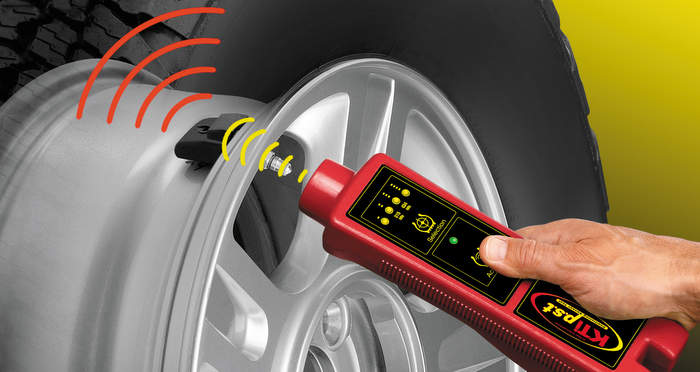
Step 4: Use a TPMS Diagnostic Tool
For precise identification, invest in or borrow a TPMS scan tool (e.g., from brands like Autel or Foxwell).
- Activate each sensor: Hold the tool near the valve stem to trigger it; it should display ID, pressure, and battery status.
- Check for low battery or no signal: Dead batteries mean replacement.
- Note: Sensors are vehicle-specific; ensure compatibility.
This step confirms which sensor is faulty, saving time on guesswork.
Step 5: Scan for OBD-II Codes
Connect an OBD-II scanner to the port under the dashboard.
- Select “TPMS” or “Body Control Module.”
- Retrieve codes (e.g., C0750 for left front sensor issues).
- Interpret them using your vehicle’s service manual or online resources.
- Clear codes after fixes and test drive.
If codes point to wiring or ECU faults, professional help is advised.
Step 6: Test for Interference and Battery Issues
- Park away from electronics; test in an open area.
- Check vehicle battery: Low voltage can affect the service tire monitor system.
- Replace sensor batteries if accessible (though most are sealed units requiring full replacement).
Step 7: Professional Diagnosis if Needed
If DIY steps fail, visit a mechanic. They use advanced tools to reprogram sensors or inspect wiring.
Throughout, prioritize safety: Never drive with unresolved tire issues.
Prevention and Maintenance Tips
Prevent service tire monitor system problems by:
- Checking pressures monthly.
- Rotating tires every 6,000 miles with relearn.
- Avoiding harsh roads.
- Replacing sensors during tire changes if over 5 years old.
Regular maintenance extends system life and enhances safety.
Conclusion
Diagnosing service tire monitor system issues doesn’t have to be daunting. By following this step-by-step guide, you can identify and resolve most problems efficiently, ensuring your vehicle remains safe and reliable. Remember, the key is prompt action—don’t ignore warnings. With proper care, your TPMS will serve you well for years.
FAQ
What does the “Service Tire Monitor System” warning mean?
The “Service Tire Monitor System” warning indicates a malfunction in your vehicle’s TPMS, such as a faulty sensor, dead battery, or communication issue. It’s distinct from a simple low-pressure alert and requires diagnosis to resolve.
How do I reset the service tire monitor system on my Chevy or GMC?
To reset, turn the ignition to ON, navigate to the tire pressure menu via the DIC, and hold the reset button until confirmed. Drive for 10 minutes afterward. If it doesn’t clear, check for underlying issues.
Can I drive with the service tire monitor system light on?
Yes, but cautiously. It means your tires aren’t being monitored properly, increasing risks from undetected pressure loss. Address it soon.
How much does it cost to fix service tire monitor system issues?
Sensor replacement costs $50-100 per tire, plus labor ($100-200 total). Simple resets might be free at a tire shop.
Are service tire monitor system problems covered under warranty?
Often yes, if under 3 years/36,000 miles for GM vehicles. Check your warranty for specifics on TPMS components.
Why does the warning appear after new tires?
New tires or rotations may require sensor relearning to match positions. Use a TPMS tool or drive cycle to reset.
How long do TPMS sensors last?
Typically 5-10 years or 60,000-100,000 miles, limited by internal batteries.
Can cold weather trigger the service tire monitor system?
Yes, cold air contracts, dropping pressure. But if it persists after warming, inspect sensors.
Do all vehicles have a service tire monitor system?
Most post-2008 U.S. models do, mandated by law. GM uses “Service Tire Monitor System” phrasing specifically.
What tools do I need for diagnosis?
A tire gauge, jack, TPMS scan tool, and OBD-II scanner are ideal for thorough checks.

