The display backlight service program (commonly known as the “Flexgate” repair initiative) was one of Apple’s most discussed service initiatives in recent years. Launched in May 2019, this program addressed a widespread design flaw in certain 13-inch MacBook Pro models where the display backlight could fail due to a fragile flex cable that tore from repeated opening and closing of the lid.
Although the official display backlight service program has now expired as of 2025, thousands of users still own these machines that may develop the problem, and understanding the issue remains highly relevant for owners of 2016–2018 MacBook Pros, repair technicians, and anyone considering a used purchase.
This ultimate guide covers everything: the root cause of the problem, symptoms, affected models, the history and details of the display backlight service program itself, current repair options (including cheaper third-party fixes), prevention tips, and whether newer models are safe.
What Is Flexgate, and Why Did Apple Create the Display Backlight Service Program?
“Flexgate” is the community-coined name (following Apple’s tradition of “-gate” scandals like Antennagate or Bendgate) for a hardware design flaw in 2016–2018 13-inch MacBook Pros. The display data cable (a thin ribbon flex cable that carries power and data to the backlight) was too short. Every time the user opened the lid beyond ~90–100 degrees, the cable was stretched. Over time (usually after 2–4 years of normal use), the cable would fatigue and tear, causing:
- “Stage lighting” effect—uneven backlight bleeding from the bottom of the screen that looks like theater stage lights.
- Complete backlight failure when the screen is opened past a certain angle.
- In severe cases, total backlight failure or display artifacts occur even when closed.
Apple initially denied it was a widespread issue, but after iFixit published a teardown in January 2019 proving the cable was 2 mm shorter than in previous generations (and that 2019 models had a longer cable), Apple quietly launched the display backlight service program on May 21, 2019.
In January 2021, Apple extended the program from 4 years to 5 years after the original purchase date due to continued complaints.
The program officially ended for all units sometime between 2022 and 2024 (exact end date varied by purchase date). As of November 2025, the Apple support page returns a 404 error, confirming the display backlight service program is no longer active.
Affected Models
Only these models were ever eligible for the free display backlight service program:
- MacBook Pro (13-inch, 2016, Two Thunderbolt 3 ports) – model A1708
- MacBook Pro (13-inch, 2016, Four Thunderbolt 3 ports) – model A1706
Note: The 15-inch 2016–2019 models used a longer cable and were never part of the official program, even though some users reported similar symptoms (Apple refused free repairs for 15-inch units).
The 13-inch 2017 models (A1706/A1708) used the same short cable as the 2016 models and were also covered if purchased before February 2018. From mid-2018 onward (and all 2019+ models), Apple quietly lengthened the cable by 2 mm, eliminating the problem.
Symptoms—How to Know If You Have Flexgate
Common signs:
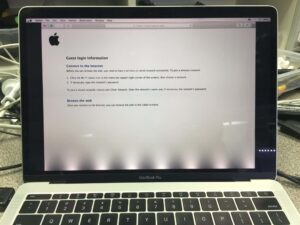
- The bottom of the screen shows bright “stage lights” or uneven backlight patches, especially noticeable on dark backgrounds.
- The backlight works perfectly when the lid is opened <90°, but fails or flickers when opened wider.
- The display works fine on an external monitor (proving it’s the backlight cable, not the logic board or GPU).
- In the terminal stages, the backlight stops working entirely, though the LCD itself still functions (you can see a faint image with a bright flashlight).
Advanced Flexgate failure – backlight completely dead when opened wide
Apple MacBook Flexgate Repair Same Day Service
Current Repair Options in 2025 (Post-Program)
Since the display backlight service program has ended, Apple will still repair the issue, but at full price—typically $600–$800 USD (they replace the entire display assembly).
However, third-party shops (and DIYers) can now fix it much cheaper because:
- iFixit proved you can replace just the flex cable (not the whole display) for ~$100–$200 in parts and labor.
- Rossmann Repair Group and others offer a “Flexgate fix” by soldering a longer cable for $150–$300.
- Some shops use the longer 2019+ cable as a permanent fix.
The actual torn flex cable under a microscope—the root cause (iFixit teardown)

Prevention Tips for the Remaining 2016–2018 Owners
If your machine hasn’t failed yet:
- Never open the lid beyond 130° (use a stand or external monitor if needed).
- Use apps like “Lid Angel” or “Keep Display On” to disable the backlight when using an external display.
- Avoid carrying the laptop open or putting pressure on the screen.
- Consider proactive cable replacement (~$200) if your machine is valuable to you.
Is It Worth Buying a 2016–2018 MacBook Pro in 2025?
Only if:
- The seller can prove the display has already been replaced under the program (check the serial at the Apple Store), or
- You get a third-party flexgate fix done immediately after purchase.
Otherwise, the risk is high—most units from that era will eventually fail.
All 2019 and newer MacBook Pros (Intel and Apple Silicon) use the longer cable and are considered safe.
FAQ – Display Backlight Service Program & Flexgate (2025 Edition)
Q: Is the display backlight service program still active in 2025? A: No. It has fully expired for all units. The Apple support page is gone.
Q: My 2017 MacBook Pro just got stage lights. What now? A: Go to a reputable third-party repair shop that offers cable-only replacement (Rossmann, iFixit partners, etc.) or pay Apple ~$700 for full display replacement.
Q: Will Apple still fix it for free if I complain loudly? A: Almost certainly not in 2025. The program is closed.
Q: Did the M1/M2/M3/M4 MacBook Pros ever have Flexgate? A: No. Apple redesigned the cable routing starting with the 2019 16-inch and all subsequent models.
Q: Can I fix it myself? A: Yes, if you’re experienced. iFixit sells the longer 2019 cable and has a guide. Difficulty: 8/10.
Q: My 15-inch 2018 has the same problem—why wasn’t it covered? A: Apple claimed the cable was long enough in 15-inch models. The community disagrees, but Apple never extended the program.

